Protecting Your Workplace
In the wake of the pandemic, over half the workforce has been working from home. As a business that means protecting your networks, data, and apps has become more complicated.
Employees who spend a lot of time at home increasingly blur the lines between work and play, and company-issued devices end up getting used for personal stuff like social media, online shopping, and even telehealth appointments. The risk of a cyberattack is ever-present with these uses.
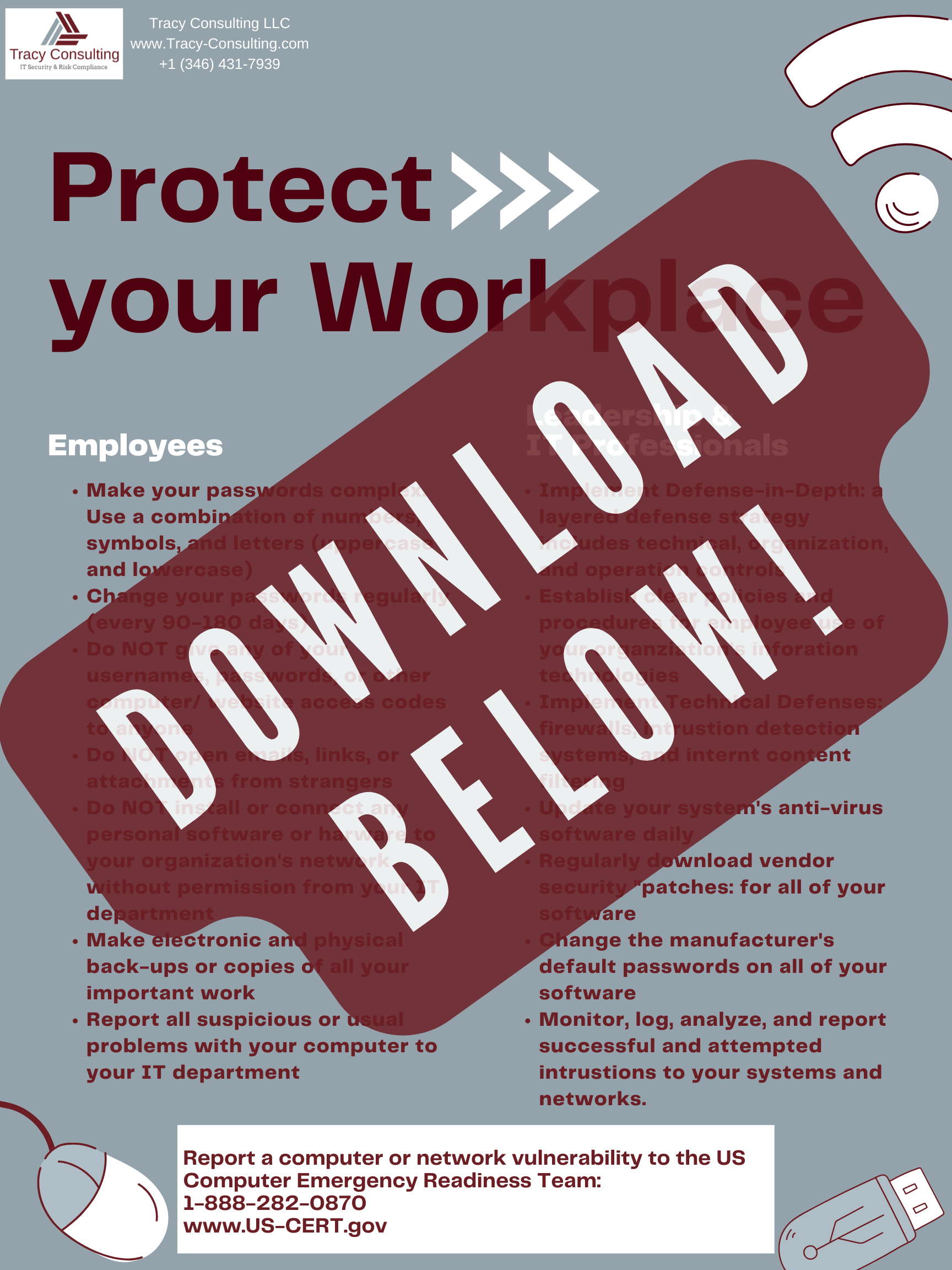
There’s no better time to beef up information security than now. Scroll down to find our “Protecting Your Workplace” poster.
Common Threats
What kind of threats do business face?
1) Phishing
No matter how big or small your company is, phishing is the biggest, most damaging, and most widespread threat. Almost 75% of companies had phishing attacks in 2020. In addition, phishing attacks account for almost 90% of all breaches a company experiences. Social engineering is when the attacker sends a phony message to trick the victim into revealing sensitive information to the attacker or installing malicious software on the victim's system.
As it targets humans rather than specific tech, phishing attacks are hard to stop. However, there are technological measures companies can put into place to protect their employees. For instance, email security platforms can prevent these messages from reaching employees' inboxes. These platforms allow employees to report phishing emails, and the admin can then delete the emails from everyone's inbox. Anti-virus software detects, protects from, and removes malware from your computer or mobile device that might have been installed by clicking on a link in a phishing email.
Training is your best defense against phishing. The security team should provide annual awareness training that includes identifying phishing emails. Here are a few things to cover:
Be careful of email impersonations and check the sender's email address.
Before clicking on the URL in an email, hover over it to see if it's legit.
Keep an eye out for redirects and subtle differences in content.
Authentic brands won't ask you for sensitive information. Instead of hitting reply, you should get in touch with the brand or person directly if you've been asked.
2) Malware Attacks
Malware is just a broad term for viruses, Trojan horses, and other destructive computer programs threat actors use to get into systems and networks. Short for malicious software, malware is a file or code that infects, probes, steals, or does basically whatever an attacker wants. Because malware comes in so many varieties, there are lots of ways to infect computers. Despite its diversity, malware usually has one of these goals:
Give an attacker remote control over an infected machine.
Use the infected machine to send spam to unsuspecting victims.
Explore the infected user's network.
Steal sensitive data.
Solutions like Endpoint Protection prevent malware downloads, give admins a central control panel to manage devices, and ensure all users have up-to-date security. Additionally, Web Security prevents users from visiting malicious websites or downloading malicious software.
Endpoint protection is available in many forms. Check out Expert Insights for user reviews. You'll find that many of these companies provide both endpoint and web security.
3) Ransomware
The popularity of ransomware is growing since it is one of the most lucrative types of attacks. An attacker uses ransomware to encrypt company data so that it can't be accessed or used. Then a ransom is demanded to decrypt the data.
According to CrowdStrike's 2022 Global Threat Report, ransomware was responsible for 82% of data leaks in 2020 and 2021.
Strong endpoint protection is key to preventing these types of attacks. It will help prevent ransomware from encrypting data. You can prevent data loss by using a cloud backup solution. It's important to research which backup method will work best for your company because there are plenty of options.
4) Weak Passwords
A common threat to companies is employees using weak passwords that are easy to guess/hack. You should use a long, complicated password, and change it often (we recommend every three months). And never use the same password for multiple accounts. In our post 12 Tips for Password Security, we explained password security in detail.
5) Insider Threats
The last threat is something no company wants to think about: insider threats. Employees, contractors, and associates who have access to a company's systems and intentionally or unintentionally cause harm are insider threats.
According to Verizon's 2021 Global Breach Investigation Report, insider threats account for 22% of security incidents. Insiders fall into three different categories: negligent insiders, malicious insiders, and insiders who steal credentials.
In 2021, the Ponemon Institute did a cost analysis of insider threats.
Negligent Insiders (56%), who make simple mistakes, are ignorant, and careless: cost companies on average $2.7K per incident and $6.6M to fix them.
Negligence that led to password theft (18%): Costs companies on average $6,7K for each attack and $4,6M per year to fix it
Malicious Insiders (26%): average cost is $6.1M per incident, and a remediation cost is $4.1M per year
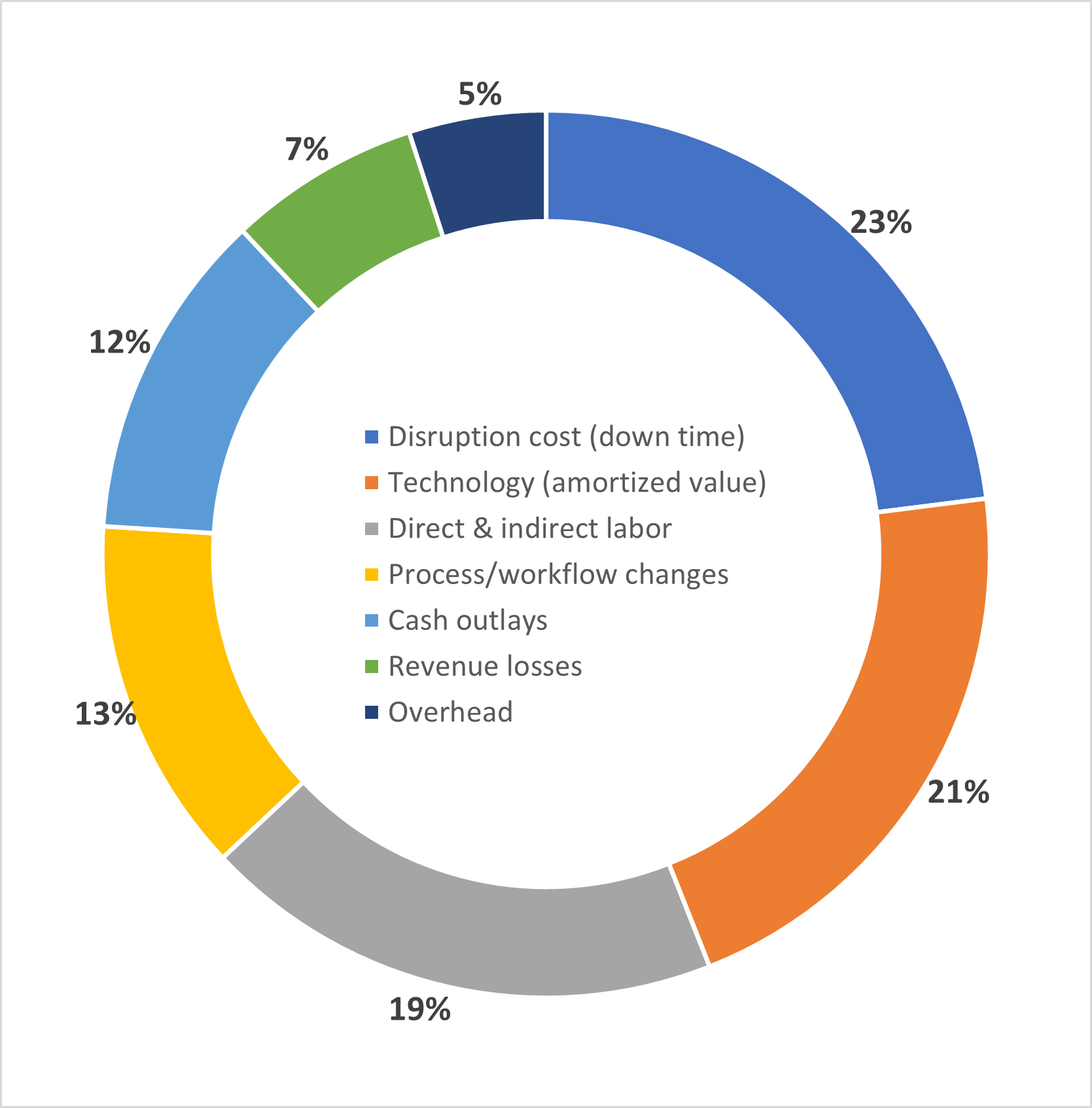
Here's how insider cost breaks down by business consequence.
Assess Your Business Risk
So, now you know the risks to your business but do you know where you stand against them? This is where a cybersecurity risk assessment comes into play.
There are several ways to conduct a cybersecurity risk assessment and their specific details go beyond the scope of this post. It is important to know that the assessment will identify where your business is vulnerable and help create an action plan. Contact us at consult@tracy-consulting.com to find out how we can help you perform a cybersecurity risk assessment.
While there is no substitution for having a dedicated team to help you identify and improve measures, there are still several options for business of more limited means to still improve their cybersecurity posture.
The FCC offers a cyber planner to help small businesses create customized cybersecurity plans.
The CISA offers a Cyber Resilience Review (CRR) to evaluate your business’s operational resilience and cybersecurity practices. You can either perform the CRR as a self-assessment or request a DHS-facilitated assessment.
The CISA offers several scanning and testing services as part of their Cyber Hygiene Services to help businesses reduce their exposure to threats.
We are all part of the global information and communications technology (ICT) supply chain. The CISA provides an ICT Supply Chain Toolkit to help your business understand its role in the ICT supply chain and how to increase your supply chain resilience.
Cybersecurity Best Practices
After you assess your risk and close any gaps that were identified, it is important to educate employees on cybersecurity best practices. It is important for them to understand that cybersecurity in the workplace is everyone’s responsibility, not just the security team’s.
Here are 26 best practices for physical security and cybersecurity guidance.
Physical Security
Monitor and control who enters your workplace.
Check for identification and ask individuals to identify the purpose of their visit.
Report broken doors, windows, and locks to your organization’s and/or building’s security personnel as soon as possible.
Backup or copy sensitive and critical information and databases on a regular basis.
Store, lock, and inventory all keys, access cards, uniforms, badges, and vehicles.
Monitor and report suspicious activity in or near your facility’s entry/exit points, loading docks, parking areas, garages, and immediate vicinity.
Report suspicious packages to your local police. DO NOT OPEN or TOUCH.
Shred or destoy all documents that contain sensitive personal information that is no longer needed.
Keep an inventory of your most critical equipment, hardware, and software.
Store and lock your personal items such as wallets, purses, and identification when not in use.
Cybersecurity Guidance
Employees
Make your passwords complex (see our post 12 Tips for Password Security for guidance) and change them regularly.
Do not give any of your usernames, passwords, or other computer/website access codes to anyone.
Do not open emails, links, or attachments from strangers.
Do not install or connect any personal software or hardware to your organization’s network without permission from your IT department.
Make electronic and physical back-ups or copies of all your important work.
Report all suspicious or unusual problems with your computer to your IT department
Leadership & IT Professionals
Implement Defense-in-Depth: a layered defense strategy that includes technical, organizational, and operational controls.
Establish clear security policies and practices to protect sensitive information and on information technologies. Hold employees accountable for these policies and practices.
Ensure antivirus is installed and regularly daily on all devices even BYOD (bring-your-own-devices).
Implement technical defenses: firewall, intrusion detection systems, and internet content filtering.
Secure and encrypt your company’s Wi-Fi. If you choose to operate a wireless local area network (WLAN) for customers, guests, and visitors, this should be separate from the main company network so that public traffic cannot traverse with the company’s internal systems.
Implement multi-factor authentication (MFA) where possible.
Implement security and awareness training for all new employees and require an annual refresher for all employees.
Regularly download vendor security “patches” for all of your software.
Change the manufacturer’s default passwords on all software and devices.
Monitor, log, analyze, and report successful, and attempted intrusions to your systems and networks.
What practices does your company have in place for cybersecurity? Learn how we can help you by contacting us at consult@tracy-consulting.com